FreePDF: The Hyperlink tool is not included in FreePDF.
To create a link to another document, proceed as follows:
| 1. | Choose the ribbon command Insert | group Links | Hyperlink  . . |
| 2. | Use the mouse to drag a box around the area that you want to define as a hyperlink. You can still resize this box after its creation if it was initially set incorrectly. |
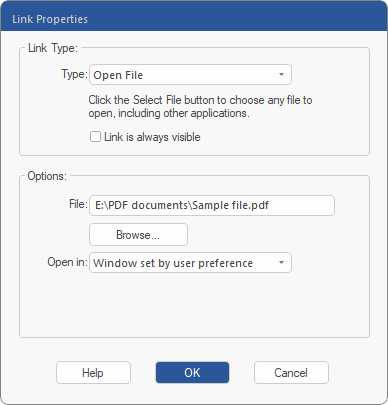
| 3. | After drawing the hyperlink box, the dialog box Link Properties will be displayed. |
| 4. | Change the Link Type to Open File. |
| 5. | Select Link is always visible if you want the link to always be displayed as an outlined rectangle. |
| 6. | Enter the name of the File or click on Browse. |
| 7. | If you want, you can set in Open in how the PDF will open. This property is not used by FlexiPDF, although it is supported by other PDF viewers. |