To rotate pages, proceed as follows:
| 1. | Choose the ribbon command Pages | group Edit | Rotate  . . |
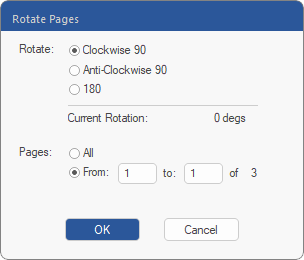 |
| 2. | Select the rotation and pages to which the action is to be applied. |
| 3. | The dialog box displays the current rotation below the 180° radio button. |
|
<< Click to Display Table of Contents >> Rotating pages |
To rotate pages, proceed as follows:
| 1. | Choose the ribbon command Pages | group Edit | Rotate . |
|
| 2. | Select the rotation and pages to which the action is to be applied. |
| 3. | The dialog box displays the current rotation below the 180° radio button. |