Syntax:
AGGREGATE(FunctionID; Options; Range1 [; Range2; Range3...])
or
AGGREGATE(FunctionID; Options; Range1 [; k])
Description:
This function applies one of the calculation functions listed below to one or more cell ranges. You can specify exactly which type of cells should be ignored: hidden rows, error values, nested SUBTOTAL or AGGREGATE functions.
Note: Another variant of AGGREGATE is the SUBTOTAL function. While SUBTOTAL ignores hidden cells, AGGREGATE can also ignore error values and nested functions.
Range1, Range2, etc., are the cell ranges you want to evaluate.
k (optional) is an integer that specifies the position in the Range for such functions that require this additional argument (must be specified for the functions LARGE, SMALL, PERCENTILE.INC, PERCENTILE.EXC, QUARTILE.INC and QUARTILE.EXC).
FunctionID specifies which arithmetic function to apply. Enter a numeric value between 1 and 19 according to the following table:
Value |
Function |
Explanation |
1: |
AVERAGE |
(arithmetic mean) |
2: |
COUNT |
(number of cells filled with numbers) |
3: |
COUNTA |
(number of cells filled) |
4: |
MAX |
(maximum) |
5: |
MIN |
(minimum) |
6: |
PRODUCT |
(product) |
7: |
STDEV.S |
(standard deviation of a sample) |
8: |
STDEV.P |
(standard deviation of entire population) |
9: |
SUM |
(sum) |
10: |
VAR.S |
(variance of a sample) |
11: |
VAR.P |
(variance of entire population) |
12: |
MEDIAN |
(Median: number in the middle of a series of numbers) |
13: |
MODE.SNGL |
(most frequently occurring value) |
14: |
LARGE |
(k-th largest value) |
15: |
SMALL |
(k-th smallest value) |
16: |
PERCENTILE.INC |
(quantiles of a data set, including values) |
17: |
QUARTILE.INC |
(quartiles of a data set, including values) |
18: |
PERCENTILE.EXC |
(percentiles of a data set, excluding values) |
19: |
QUARTILE.EXC |
(quartiles of a data set, excluding values) |
If, for example, you set FunctionID to 9, the AGGREGATE function returns the sum of the specified cell range(s) – but ignores all cells that you exclude with the Options parameter (see table below).
Use the Options argument to specify which type of cells should be ignored. Enter a numeric value between 0 and 7 according to the following table:
Value |
Behavior |
0 or omitted: |
Ignore nested SUBTOTAL and AGGREGATE functions |
1: |
Ignore hidden rows, nested SUBTOTAL and AGGREGATE functions |
2: |
Ignore error values, nested SUBTOTAL and AGGREGATE functions |
3: |
Ignore hidden rows, error values, nested SUBTOTAL and AGGREGATE functions |
4: |
Ignore nothing |
|
Ignore hidden rows |
6: |
Ignore error values |
7: |
Ignore hidden rows and error values |
If, for example, you set FunctionID to 9 and Options to 5, AGGREGATE returns the sum of the specified cell range(s) – but ignores all cells that have been hidden via the commands of the ribbon tab Data | group Filter.
In addition, all rows will be ignored that were hidden manually via the ribbon command Home | group Cells | Visibility | Hide rows or via the ribbon command Data | group Outliner | Group.
Please note: Only hidden rows will be ignored, while hidden columns will still be included in the calculations.
Example:
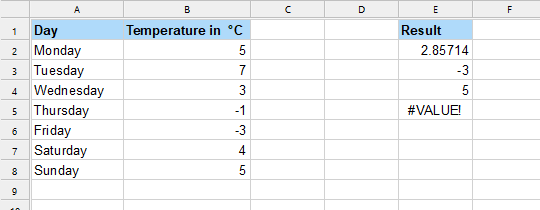
AGGREGATE(1, 4, B2:B8) in cell E2 returns 2.85714. The formula calculates the average for the temperatures in the cell range B2:B8. No type of cells are ignored.
AGGREGATE(5, 4, B2:B8) in cell E3 returns -3. The formula calculates the lowest value for the temperatures in the cell range B2:B8. No type of cells are ignored.
AGGREGATE(14, 4, B2:B8;2) in cell E4 returns 5. The formula calculates the second highest value for the temperatures in cell range B2:B8 by specifying the FunctionID 14 (LARGE) and the k=2 parameter. No type of cells are ignored.
AGGREGATE(14, 4, B2:B8) in cell E5 results in the #VALUE! error value. This happens because the k parameter is mandatory for FunctionIDs 14-19.
See also:
SUBTOTAL, section Filtering cells by their content