Syntax:
NETWORKDAYS(StartDate, EndDate [, Holidays])
Description:
This returns the number of workdays between StartDate and EndDate.
This function counts workdays only, and Saturdays and Sundays are skipped. You also have the option of specifying a list of holidays to be skipped as well (see Holidays parameter).
Note: A more flexible variant than NETWORKDAYS is the NETWORKDAYS.INTL function, as the weekend parameter can be defined individually here.
StartDate and EndDate are the first and the last day of the time interval to be evaluated.
Holidays (optional) is a cell range or an array containing a list of dates to be skipped (for example, holidays). (This is usually done using a cell range or an array containing the corresponding date values.)
Example:
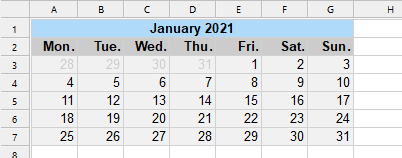
Calendar sheet January 2021 (for better orientation)
NETWORKDAYS("01/01/2021", "01/31/2021") returns 21.
January 2021 thus had 21 work days (not including holidays).
If you want to include the holidays on 1/1/2021 and 1/6/2021 (in most European countries), you can enter these two dates in cells A1 and B1, for example, and then write them as follows:
NETWORKDAYS("01/01/2021, "01/31/2021", A1:B1)
The result is 19, as these holidays both fell on weekdays in 2021, so 2 days are to be deducted.
See also:
NETWORKDAYS.INTL, WORKDAY, WORKDAY.INTL;DAYS/DAYSP, DAYS360, DATEDIF, HOLIDAY