Syntax:
SEQUENCE(Rows [; Columns] [; StartValue] [; Step])
Description:
This function generates a list of self-defined sequential numbers.
Rows is the number of rows to be returned. If omitted, the default value 1 is used.
Columns (optional) is the number of columns to be returned. If omitted, the default value 1 is used.
StartValue (optional) is the first number in the sequence. If omitted, the default value 1 is used.
Step (optional) is the increment between each subsequent value. If omitted, the default value 1 is used.
Note:
You can also apply the function to multi-column tables and the output range automatically expands to adjacent cells as needed (simply press the Enter key as usual after entering the formula in the cell). In addition, the result is automatically updated when changes are made to the initial list. For this reason, such formulas are also considered to be functions with a dynamic output range.
If you apply the function to multi-column tables and this causes a spill over to adjacent cells in the results area, a #SPILL! error value will be displayed if those cells are already filled with content. Therefore, make sure that the adjacent area is as empty as needed for the intended expansion of the formula.
Compatibility notes:
Microsoft Excel supports this function only in version 2021 or later. The function is unknown in older versions.
Examples:
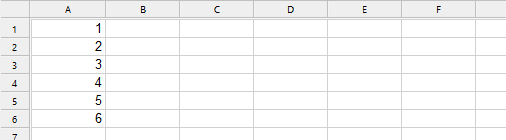
Example 1: Sequence of numbers with multiple rows in one column
The formula SEQUENCE is applied in cell A1.
SEQUENCE(6, 1, 1, 1) returns the following list:
Example 2: Sequence of numbers with multiple columns in one row
The formula SEQUENCE is applied in cell A1.
SEQUENCE(1, 6, 1, 1) returns the following list:

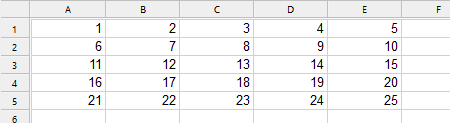
Example 3: Sequence of numbers spread across multiple columns and rows
The formula SEQUENCE is applied in cell A1:
SEQUENCE(5, 5, 1, 1) returns the following list:
Example 4: Sequence of numbers as in example 2, but with a different StartValue
The formula SEQUENCE is applied in cell A1:
SEQUENCE(1, 6, 3, 1) returns the following list:

Example 5: Sequence of numbers as in example 2, but with a different incremental step
The formula SEQUENCE is applied in cell A1:
SEQUENCE(1, 6, 1, 2) returns the following list:

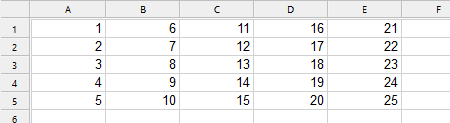
Example 6: Sequence of numbers as in example 3, but transposed
By default, the sequence of numbers first run horizontally and then vertically. If you would prefer the sequence of numbers to first run vertically and then horizontally, combine the formula with the TRANSPOSE function.
The formula SEQUENCE is applied in cell A1, in combination with the formula TRANSPOSE:
TRANSPOSE(SEQUENCE(5, 5, 1, 1)) returns the following list:
See also: