You sometimes want to insert copied cells in a place that already contains values. If you only want to move these values rather than overwrite them when pasting something from the clipboard, you have the following option:
The ribbon command Home | group Cells | Insert  | Insert copied cells inserts cells, rows or columns from the clipboard into the worksheet.
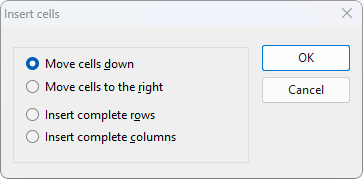
The program opens a dialog box in which you can select how the cells should be inserted:
▪Move cells down
| The copied cells from the clipboard are pasted into the selected place. |
| The cells below the insertion will be moved down. |
▪Move cells to the right
| The copied cells from the clipboard are pasted into the selected place. |
| The cells to the right of the insertion will be moved further to the right. |
▪Insert complete rows
| The copied rows from the clipboard are pasted into the selected place. |
| The rows below the insertion will be moved down. |
▪Insert complete columns
| The copied columns from the clipboard are pasted into the selected place. |
| The columns to the right of the insertion will be moved further to the right. |