In the Outline view (ribbon command View | Outline), you can also theoretically enter, edit and format text. However, the standard view is better suited for these tasks, and it is recommended that you switch back to standard view to perform them.
Deleting, copying and moving text
On the other hand, the outline view is especially well suited to deleting, copying and moving headings together with the associated text.
The easiest way to perform these tasks is to make use of the plus and minus symbols to the left of the headings. By clicking on one of these symbols, you can select the heading and any subordinate text. You can now delete, copy or move the contents of your selection with the usual commands in the ribbon tab Home. For more information, see Working with selections).
To move a heading and its associated text, for example, proceed as follows:
| 1. | Click on the plus  or minus or minus  icon to the left of the heading. Thus, you select the heading and all its subordinate text. icon to the left of the heading. Thus, you select the heading and all its subordinate text. |
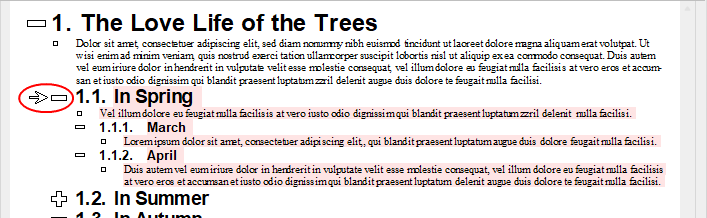
| 2. | Choose the ribbon command Home | Cut. |
| 3. | Position the text cursor at the beginning of the line before which you want to reinsert the text that you just cut. |
| 4. | Choose the ribbon command Home | Paste. |
| As an alternative to steps 2. to 4., you can also use the mouse to move the selected text: Grab the plus or minus icon with the mouse and move the text up or down to the desired position. |
The heading and its associated text have now been moved together.
Tip: There are also two shortcut keys available for moving selected text: Alt+Shift+Arrow up moves the text up one paragraph, while Alt+Shift+Arrow down moves it down one paragraph (Mac: Ctrl+Shift+Arrow up/down). These shortcut keys also apply to the paragraphs described below.
Moving paragraphs up or down
In addition to the aforementioned method for moving entire outline sections, you can also move individual paragraphs within the outline.
If you only want to move a single paragraph, simply place the cursor in the desired paragraph. If you want to move several paragraphs, select them completely with the mouse or keyboard.
Then use the following icons in the outline view:
Icon |
Function |
|
Moving paragraphs upwards. |
|
This lowers the paragraph's outline level by 1. |

