FreePDF: These functions are only possible in FreePDF for newly inserted text boxes.
Select text with the Text edit tool  and choose the command Spacing
  on the ribbon tab Home | group Character to open the dialog box Text Spacing. In it, you will find the options that can be changed:
▪Letter Spacing and Word Space
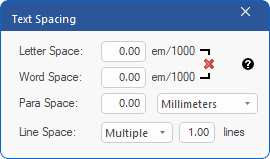
Press  to reset both the letter space and word space to the default value 0.
To change the current line space, you can also select the Line spacing  button on the ribbon tab Home | group Text box.