Syntax:
MUNIT(Dimension)
Description:
Returns a unit matrix with the specified size.
Dimension is an integer value that specifies the dimension (rows x columns) of the unit matrix. This value must be greater than 0, otherwise the #VALUE! error value is returned.
Note:
The function is designed so that the output range automatically expands to adjacent cells as needed (simply press the Enter key as usual after entering the formula in the cell). In addition, the result is automatically updated when changes are made for the parameter Dimension. For this reason, such formulas are also considered to be functions with a dynamic output range.
If the function causes a spill over to adjacent cells in the results area, a #SPILL! error value will be displayed if those cells are already filled with content. Therefore, make sure that the adjacent area is as empty as needed for the intended expansion of the formula.
Example:
MUNIT(3) returns the following 3x3 unit matrix for cells A1-C3.
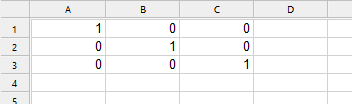
This function is relevant for matrix operations in linear algebra. Here, you can use this function to quickly generate neutral matrices without having to manually enter values for ones and zeros.
For example, combine the MUNIT function with the MMULT function to multiply two matrices. Cells A1:C3 contain values from an array. If you enter the formula below in cell E1, you will get the following result:
MMULT(A1:C3, MUNIT(3))

See also:
Section Working with arrays, RANDARRAY, MDETERM, MINVERSE, MMULT, MSOLVE, TRANSPOSE