Syntax:
TOROW(Range [; Ignore] [; ByColumn])
Description:
This function returns a cell range in a list as a single row. You can optionally choose whether the search direction for returning the data should be by row or by column and whether you want to ignore empty entries or errors.
Note: With the TOROW function, the data is returned in a horizontal direction. To return in a vertical direction, use TOCOL instead.
Range is the cell range or array from which the values are to be returned in a list.
Ignore (optional) specifies whether certain types of values should be ignored. If omitted, the default value 0 is used (none of the values are ignored).
0 = All values will be kept
1 = Cells with empty values will be ignored
2 = Cells with error values will be ignored
3 = Cells with empty values and error values will be ignored
ByColumn (optional) specifies whether the returned data should be sorted by row or by column. FALSE searches the range in the direction of the row and TRUE in the direction of the column. If omitted, FALSE is used as the default value and thus row 1 is searched first horizontally, then row 2 horizontally, etc.
Note:
The function is designed so that the output range automatically expands to adjacent cells as needed (simply press the Enter key as usual after entering the formula in the cell). In addition, the result is automatically updated when changes are made to the initial list. For this reason, such formulas are also considered to be functions with a dynamic output range.
If the function causes a spill over to adjacent cells in the results area, a #SPILL! error value will be displayed if those cells are already filled with content. Therefore, make sure that the adjacent area is as empty as needed for the intended expansion of the formula.
Compatibility notes:
Microsoft Excel supports this function only in version 2024 or later. The function is unknown in older versions.
Examples:
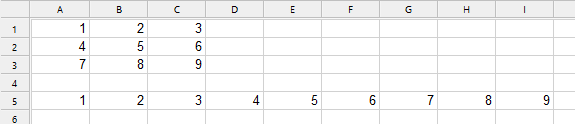
Example 1: Search list row by row
The formula TOROW is applied in cell A5:
TOROW(A1:C3) returns in line 5 a list of all data from the Range and with row-by-row search direction.
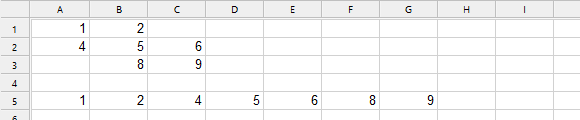
Example 2: Search list row by row and ignore empty cells
The formula TOCOL is applied in cell A5:
TOROW(A1:C3, 1) returns in line 5 a list of all data from the Range and with row-by-row search direction. Empty cells were removed.
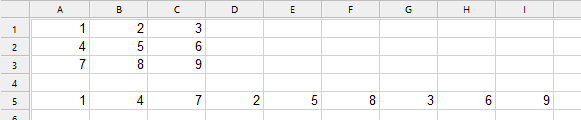
Example 3: Search list column by column
The formula TOCOL is applied in cell A5:
TOROW(A1:C3, , TRUE) returns in line 5 a list of all data from the Range and with column-by-column search direction.
See also: