Syntax:
MATCH(Crit; Range [; MatchMode])
Description:
The program searches a cell range for a search criterion and then returns its position within this cell range.
Note: An improved version of MATCH is the newer XMATCH function, as it works both from top to bottom and vice versa (MATCH works from top to bottom only). In addition, XMATCH returns exact matches by default.
Crit is the value for which the search is performed. Both numbers and text or a cell reference are permitted.
Range is the cell range or array to be evaluated. This can contain either text strings, numbers or logical values. Range must be a range, which is an array or a cell range of either only one row or one column.
MatchMode specifies the type of search to be performed:
1 or omitted: Find the largest value that is equal to or smaller than Crit. Important: In this mode, the elements in Range have to be sorted in ascending order. Otherwise, the function may return incorrect results.
0: Find the first value that is equal to Crit. In this mode, the elements in Range do not have to be in sorted order.
-1: Find the smallest value that is equal to or larger than Crit. Important: In this mode, the elements in Range have to be sorted in descending order. Otherwise, the function may return incorrect results.
Tip: If you use MatchMode 0 and you search for a text string, wildcard characters can be used in Crit: A question mark (?) stands for any single character, and an asterisk (*) stands for any sequence of characters.
Example:
You have a list of names and want to know in which position a particular name appears.
The formula XMATCH is applied in cell D2:
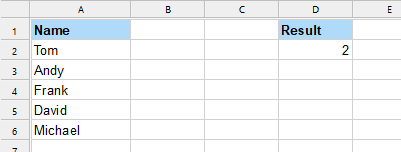
MATCH("Andy", A2:A6) returns 2, as Andy is in second position in the list.
See also: